Adobe Photoshop TM Controller for EXOdesk makes it possible to control Photoshop TM from an EXOdesk in order to boost your productivity.
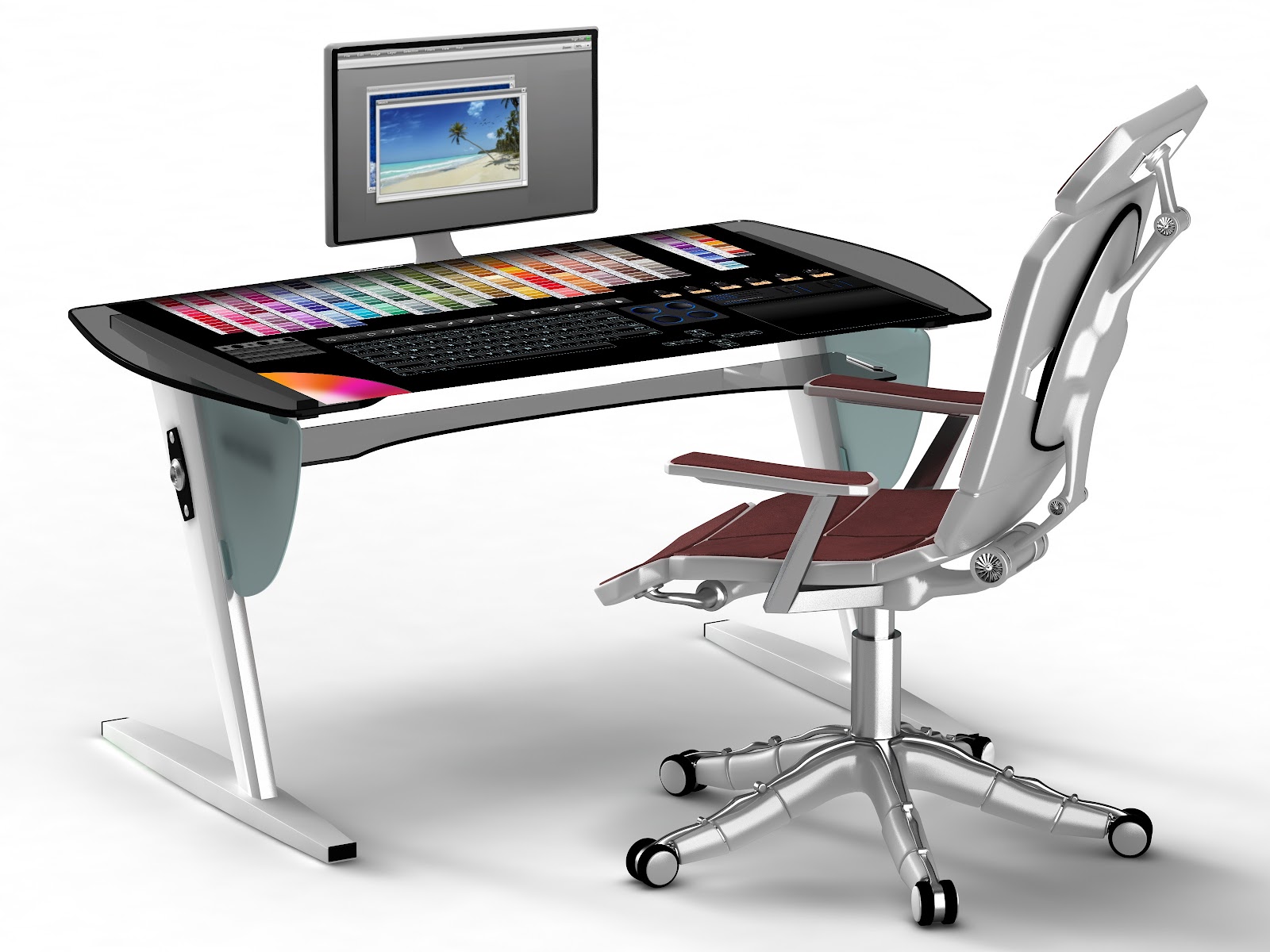
The controller is planned to be released when the EXOdesk will be available (mid-year for developers and end of year for all).
The following screen capture is a work in progress and will be updated soon.
We are implementing the following features:
- Tools
- Colors
- Layers
- Pen and brushes
- Zoom, scroll, navigate through windows
- Advanced Clipboard and undo/redo features
- Virtual keyboard (user can switch to hard keyboard)
- Virtual touch pad or virtual mouse pad (for use of a physical mouse)
- Support of capacitive pen input
We are currently working on the first prototype and are very interested in your comments and ideas.
Please add a comment to this post!


Interesting concept, although I don't think you need so much desktop space devoted to color palettes. I'd like to see a cup holder - serious! I would drink coffee more than select colors. What I mean, is a recess or space for holding physical objects
ReplyDeleteThe desk is fully customizable. You can replace colors with newsfeed or any other tool.
DeleteI agree with you - the colors are too big - and I would like the interface to be right hand/left hand switchable. The way it is set up is for right handed people. Most of the artists I know, we all are left handed and the keyboard/tablet positions should be switchable - or we cant use it.
DeleteA cup holder would help - spilling is dreaded
I come from an artistic (painting) background and am taking a course in Photoshop. To me drawing a line with a mouse and doing other functions with a mouse makes no sense. It feels totally unnatural. I want to work directly on the screen like would on a painting or drawing.
DeleteYou may want to use more the "high productivity table", 42 inches that can be used as a drawing table with no mandatory extra monitor.
DeleteI think there is too much space for the Keyboard and not enough for the tablet. Most of the time, tablet is in use complemented by a few keystroke combination
Deletewow and double wow... need any testers???
ReplyDeleteCan I use this for Premiere and or Illustrator as well,?
ReplyDeleteWell, I agree with the recess idea for beverages, but that could also be in the form of an attachment, or slide out drawer from below.
I to have been beta testing hard and software for a couple decades now, and would be happy to to alpha or beta test this product if you need any Canadian testers.
I can provide a list of references and projects I've been involved with in the past.
bdwatters@gmail.com
Brian D. Watters
Thank you! We are partnering with ViewSonic to have some tables available ASAP... currently we only have 3 of them...
DeleteWe create the Photoshop version to showcase how to do to the developers community. If the developers community do not create the Premiere and Illustrator versions, we will do it!
DeleteIt looks like it can be use for any program, you just select from a drop down menu to open, to close you just brush it aside, watch the video
ReplyDeletethis looks simply awesome. i see that it is customizable, will it have favorites. for examples can it create new brushes sets from ones you use often?
ReplyDeleteWe are collecting ideas and requests and we just added the favorites brushes in the wishes list.
DeleteWe want to give maximum flexibility for customization as we understand this is what people want. Customization is done with natural gesture and UI objects behaviors are predictable (following physical rules)
It should have an easy way of switching the workspace/tools, a bit like what you currently have in Adobe programs. Because you will need different tools for different tasks.
DeleteE.g. you might want a different layout when doing retouching and when working with something different.
For myself... colour palettes.. for me, it would not be all that practical since I use several of the modes and, rarely, the libraries. I would suggest that, instead, how about a strip.. say the left two or three, that is dedicated to VARIOUS libraries.. eg, brushes that, at need, you can scroll through. As well, the filter libs could appear there when in use.. like when you are looking for something specific. I see that you DO have brushes, off to one side... at left... how about a part that is dedicated to the controls.. size sliders, hardness/softness, mode (airbrush etc). this could be applied to whatever you are doing at the time.. editing, painting, airbrushing filters and so-on. the strips would contain the basics and the controls would appear in the other area.. a square would be good. looks like you have a quadrant of a colour wheel in lower left. since you can move things around, I would want to have a full circle, I custom my colours a lot.
ReplyDeleteWe will publish soon a video with the UI objects we will use to implement it. For example you can turn the color wheel to have access to more colors, you can have sliding elements or floating elements.
DeleteWe will provide many tools and the user may just pick a couple of them for his own needs.
ok, the photo looks great, but I dont wanna put my eyes on the desktop every time I looking fot a tool. So I think this is a bad idea.
ReplyDeleteWe naturally look to the desktop quite often for the mouse or keyboard. It is more as extensions to the keyboard, it is more a controller than a display.
Deleteabsolutely love the design - though a bigger screen would be a huge advantage!
ReplyDeleteif you need any testers/reviews done - let me know, aussie designer would LOVE to try it out!
Can you add two monitors ?
ReplyDeleteNo cup holder or anywhere to put your physical objects.
I'm available for testing and reviews.
Yes EXOdesk is compatible with multiple monitors on PC and Mac.
DeleteWhat's the price range for this puppy?
ReplyDeleteThe target price is around $1300 end of year, but it depends on several factors. So far so good.
DeleteI live in Ukraine
ReplyDeleteHow can I order this table?
How much time is required for its production?
Ready to make an advance payment in full.
Care delivery is ready to decide for himself.
artem871205@ukr.net
The EXOdesk will be available later this year. We will let it know when available.
DeleteI think your product photo should show it with a bigger monitor. Many in your target audience probably already own 30" LCD displays.
ReplyDeleteWill do! This is a good point thank you.
DeleteWe will also showcase the EXOdesk connected to a Mac and to a dual display PC.
Please, take my money now.
ReplyDeleteIt is pressure sensitive?
ReplyDeleteIt is the goal but we cannot confirm yet...
DeleteCan I connect the exodesk to a normal Pc and use it as screen if needed?
ReplyDeleteYes the EXOdesk is connected to your regular computer as an external dislplay and can be used as a secondary monitor.
DeleteDon't forget the left handed user (switch of the pads). Also, most retouchers don't use palettes as much, and in many retouching scenarios, having so many colours visible will be very destructive.
ReplyDeletei meant "distracting", not "destructive". ;)
DeleteI use Linux Ubuntu, will the ExoDesk be supported?
ReplyDeleteReally looking forward to this.
Thanks
It is planned but not yet scheduled. We are currently finalizing the Android version and working on the MacOS version. The next one will probably be a Linux version.
Delete